

PAL & Explicit Assets
CrimeFactory uses a Primary Asset Label, or PAL, to describe content that belongs to a mod’s cook/package workflow.
Think of it as an asset selection list for Forge. Explicit Assets means the assets you select individually for inclusion.
The standard PAL created for a mod is named:
PAL_<ModName>Why the PAL matters
The PAL is part of the information CrimeFactory uses to determine which assets need to be cooked and included when the mod is Forged.
It is also used by the validation tooling to catch incorrect packaging configuration before the cook starts.
Chunk ID
A mod PAL uses a Chunk ID that must not collide with chunks used by PAYDAY 3 or its DLC.

A value greater than 100 is recommended for community mods.
|
Choose an unused value that is outside the game’s and DLC’s chunk IDs. Values above |
Explicit Assets
Use the PAL’s Explicit Assets list for assets that must be included explicitly in the mod’s package.
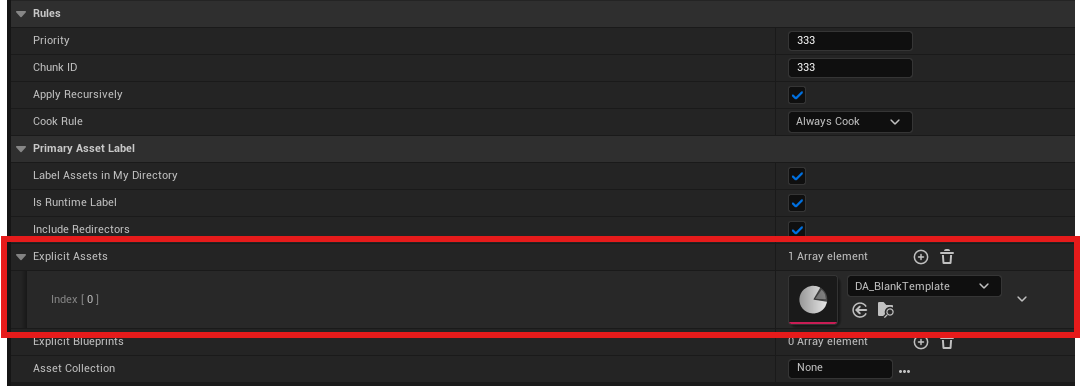
This is especially important for base-game replacement assets that use external /Game/… paths rather than the mod plugin’s own content root.
For example, the cooked-asset replacement workflow is:
-
Locate the original cooked asset under
/Game/…. -
Inspect its available defaults and references.
-
Right-click the cooked asset and choose Convert to Uncooked.
-
Make the required changes to the uncooked replacement.
-
Add the changed asset to the CrimeFactory mod PAL’s Explicit Assets list.
-
Forge the mod.
-
Test the replacement in PAYDAY 3.
See Cooked Assets for more about converting mounted game assets.
Asset Collection
The PAL’s Asset Collection field can reference a static Content Browser collection. CrimeFactory resolves its current members when preparing Forge, alongside Explicit Assets. The members do not need to be copied into the explicit list.
See Asset Collections & Bulk PAL Management for direct assignment, bulk selection, and the differences when maintaining these lists.
Asset Manager registration
CrimeFactory validates that the mod’s PAL is registered correctly with the project’s Asset Manager configuration.
If that registration is missing or incorrect, the validation pass can report the problem before Forge continues.
External /Game replacements
Assets under a mod plugin and replacement assets under /Game/… are handled differently by the Forge pipeline.
Plugin-only mods can use the normal plugin cook path.
When external /Game/… replacements are present, CrimeFactory uses its additional replacement cook stage so both plugin content and the external replacement content can be included in the same forged mod.
See Forge for the two-stage workflow.