

CrimeFactory
CrimeFactory is the PAYDAY-specific mod management and authoring layer built into the modkit.
It handles the common workflow around creating mod plugins, managing their metadata and packaging configuration, validating them, and Forging them into PDML-compatible mods.
CrimeFactory creates mods as Unreal plugins under the modkit’s Mods directory. This gives every mod its own content namespace and keeps mod development separate from PAYDAY 3’s mounted /Game/… content.
Main workflow
A normal CrimeFactory workflow is:
Create Mod
   |
   v
Author mod content
   |
   v
Configure PAL / replacements
   |
   v
Validate
   |
   v
Forge
   |
   v
PAYDAY3/Mods/<ModName>/
   |
   v
PDML
CrimeFactory uses the word Forge for its cook and package operation.
Mod manager
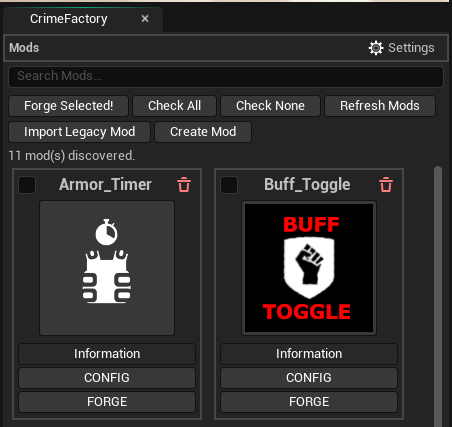
The main CrimeFactory window lists the mod plugins available in the project’s Mods directory.
From here you can:
-
search the installed development mods,
-
select mods using the card checkboxes and selection controls,
-
create a new mod,
-
import a legacy UE4 mod,
-
open a mod’s information,
-
open a mod’s configuration,
-
and Forge a mod.
Clicking a mod’s icon navigates the Content Browser directly to that plugin’s content root.
See Managing Mods for the full manager workflow.
Current templates
CrimeFactory currently includes three creation templates:
-
Blank
-
Logic Mod
-
Custom Heist
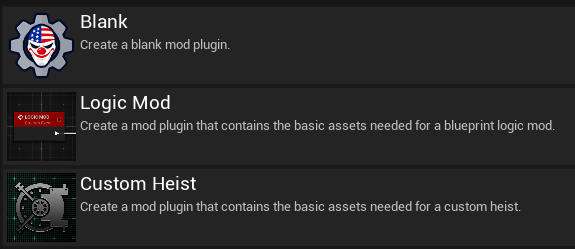
Additional specialized templates, such as HUD and audio mod templates, are planned for the future but are not part of the current workflow.
See Templates.
Forge and PDML
CrimeFactory mods are built as Unreal plugins. Forge cooks and packages only the content that belongs to the selected mod, then produces the plugin-based output expected by PDML.
The normal runtime location is:
PAYDAY3/Mods/This is intentionally separate from PAYDAY 3’s own Content/Paks directory.
See Forge.