
Asset Collections & Bulk PAL Management
Asset Collections group existing assets in the Content Browser without moving or copying them. A collection can contain assets from several folders, and an asset can belong to more than one collection.
This makes collections useful when a replacement mod changes dozens or hundreds of assets. You can review a group together and select it as a batch while each replacement keeps its original /Game/… path.
A Primary Asset Label, or PAL, tells CrimeFactory which content belongs to a mod’s Forge. You can assign a static collection directly to the PAL’s Asset Collection field, or use a collection to bulk-populate Explicit Assets.
Before you start
-
Create your CrimeFactory mod and locate its
PAL_<ModName>. See Create Mod and PAL & Explicit Assets. -
Prepare and save your editable replacements at their original names and
/Game/…paths. Follow Asset Replacements for conversion and editing instructions.
|
Use your edited, uncooked replacements. Adding read-only cooked game assets to a collection does not make them editable replacements. CrimeFactory excludes cooked collection members from forging and reports a warning. |
Create an Asset Collection
-
Open the Content Drawer at the bottom of the editor, or use an open Content Browser.
-
Show the Sources Panel if it is collapsed, then expand Collections. If the browser shows folders and collections as separate views, switch to the collections view.
-
Click the plus button beside Collections.
-
Under New Static Collection, choose Local Collection. This works without revision control.
-
Enter a descriptive name, such as
MyHUD_Replacements, and press Enter.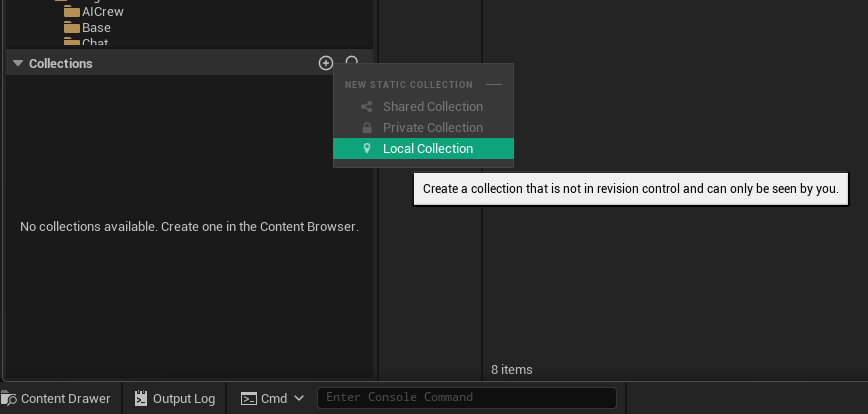
-
Browse to your saved replacement assets. Select the assets you want to group, using Ctrl-click for individual assets or Shift-click for a range.
-
Right-click the selection, open Manage Collections, and check your collection.
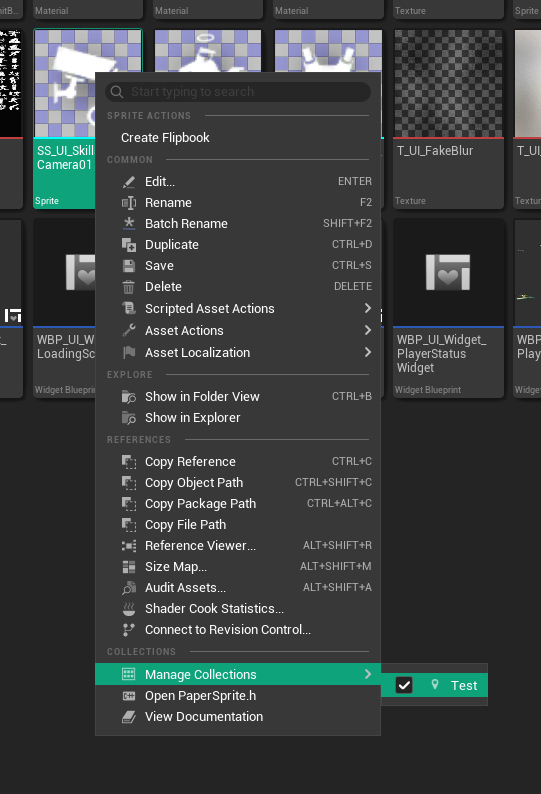
-
Click the collection in the Collections panel to review its members.
To add assets later, select them and check the same collection under Manage Collections. To remove members, select them and uncheck that collection in the same menu. Removing membership does not delete the assets.
|
A Content Browser folder represents an asset location. A collection is a list of references to assets at their existing locations. Do not move replacements into a new folder to organise this list, because replacements must keep the game’s original paths. |
Include the collection’s assets in a PAL
Choose the workflow that suits how you want to maintain the mod:
| Workflow | Use it when | What happens after membership changes |
|---|---|---|
Assign Asset Collection |
One static collection defines the replacement set. |
CrimeFactory resolves current members when preparing the next Forge. It does not copy them into Explicit Assets. |
Bulk-add to Explicit Assets |
You want an individually maintained list, or want to combine selections from several collections. |
The PAL keeps the entries you added. Update them manually when your intended replacement set changes. |
Assign a collection directly
-
Open the collection and check that it contains only the intended editable replacements.
-
Open your mod’s
PAL_<ModName>. -
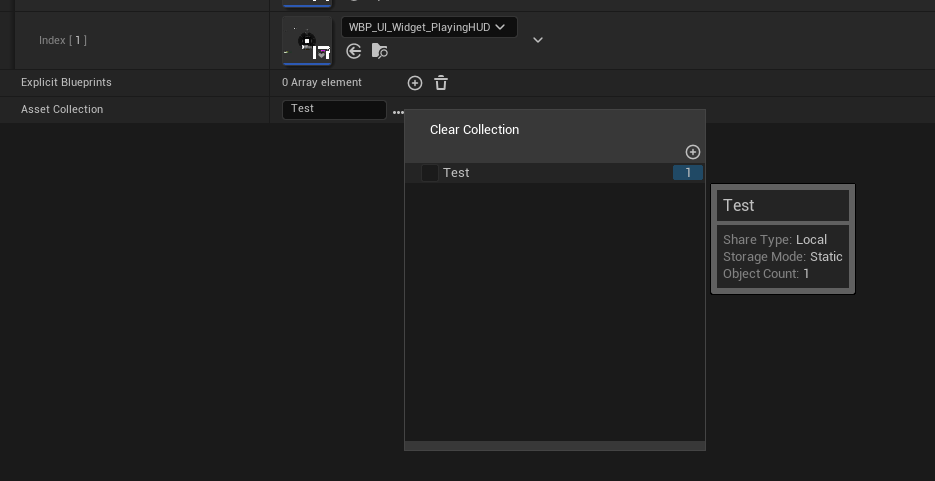
Find Asset Collection and click the picker beside the field.
-
Choose your static collection from the list.
-
Verify that the field shows the intended collection name, then save the PAL and any modified replacement assets.
The PAL now references the collection. Its members do not need matching entries in Explicit Assets. Existing explicit entries are still included, so review those for assets you no longer intend to ship.
|
Use a static collection. CrimeFactory rejects dynamic search collections as PAL sources. The PAL has one Asset Collection field, and CrimeFactory reads that collection’s own members without recursively including child collections. |
Changes to that collection are picked up when CrimeFactory prepares the next Forge. Forge again after changing membership. Removing an asset from the collection does not exclude it if it is also selected elsewhere in the PAL, such as Explicit Assets.
Local collections and another workstation
A Local Collection is not in revision control and is only visible to you. Sending the PAL alone to another author does not give them your local collection. Make sure the referenced collection exists in the editor used for Forge, or use explicit entries for a list stored in the PAL. CrimeFactory reports a missing referenced collection as an error.
Bulk-add collection members to Explicit Assets
-
Open your mod’s
PAL_<ModName>in an asset editor and arrange it beside the Content Browser so both are visible. -
In the Content Browser, open the collection containing the replacements.
-
Clear search text and asset-type filters if you want to select every member.
-
Click an asset in the results, then press Ctrl+A to select all displayed assets. Use Ctrl-click or Shift-click instead if you only want a subset.
-
In the PAL, find the Explicit Assets array.
-
Drag the selected assets from the Content Browser onto the array’s element-count area, labelled Array elements. Drop on the array header rather than an individual asset slot to add the group as entries.
-
Expand Explicit Assets. Check the new entries and their paths against your intended replacement set. Review the array count, remove duplicate or unintended entries, and check that no entry is empty.
-
Save the PAL and all modified replacement assets.
|
This adds individual references. It does not assign the collection to Asset Collection or keep Explicit Assets synchronised with it. Add new replacements to the PAL yourself, and remove entries you no longer want to include. |
Forge and check the result
-
Review the PAL’s selected collection and explicit entries. Make sure every intended replacement is covered by one of these sources.
-
Save the PAL and edited assets.
-
Follow Forge to Forge the mod.
-
Review validation and the Output Log. Resolve missing references or collection errors, and check warnings about excluded cooked members.
-
Install the complete forged mod and test the replacements in PAYDAY 3 as described in Test the replacement.
The expected result is one forged mod containing the selected replacements alongside its plugin content. Collection membership alone does not guarantee packaging: the correct mod PAL must reference the collection or contain the explicit entries, and validation and cooking must succeed.
Manage a large replacement set
-
Use names that identify the mod and category, such as
MyHUD_Textures,MyHUD_Widgets, andMyHUD_Materials. -
Keep separate working collections by asset type, feature, or replacement category. Bulk-add each required selection to the same PAL when using explicit entries.
-
For direct collection assignment, keep a single static collection containing every intended replacement as its own member. Category collections can remain useful for browsing, but nesting them under that collection does not include their members in CrimeFactory’s scan.
-
Add new replacements to your organisation collection and your chosen PAL source as part of the same task. With explicit entries, select only the new assets for the next batch.
-
Keep inspection copies, unmodified game assets, and unrelated experiments out of the replacement set. Check existing explicit entries even when using direct collection assignment.
-
Review the whole set before Forge, then test each changed category in-game. A successful Forge does not prove that every replacement behaves correctly.
Troubleshooting
An asset is missing from Explicit Assets
If the PAL directly references the collection, its members are not copied into Explicit Assets. Check Asset Collection and the collection’s own members instead.
For the manual workflow, clear browser filters, select the missing assets, and drop them onto the Explicit Assets array header. Verify the added references and save the PAL. Read-only cooked assets are not valid replacement entries; prepare the editable replacements first.
New collection members are missing from the Forge
Check whether you assigned Asset Collection or only copied entries into Explicit Assets. Copied entries need a manual update.
For direct assignment, check the collection name on the correct mod PAL and confirm the new assets belong directly to that static collection. Child collections are not scanned recursively. Save modified assets, review validation and cooked-member warnings, then Forge again.
The game still uses an original asset
Check that the replacement is saved at the original name and /Game/… path. A collection cannot correct a moved or renamed replacement.
Confirm the replacement belongs to the PAL source used by the mod you Forged, check the Forge log for failures, and make sure the updated complete mod is installed. See Test the replacement and Troubleshooting a Forge.