

Create Mod
Use CrimeFactory’s Create Mod action to create a new PDML-compatible Unreal plugin.
A plugin keeps your mod’s content and information together. Its descriptor is the .uplugin file that identifies it to Unreal and PDML.
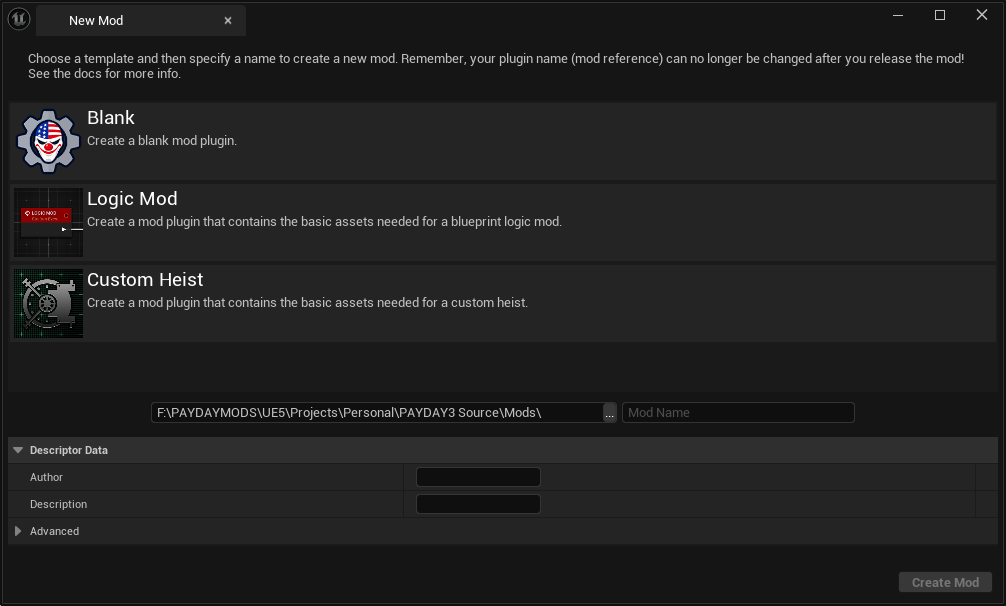
Open the New Mod window
Open CrimeFactory and click Create Mod.

The New Mod window lets you choose a template, name the plugin, and enter its descriptor data.
Choose a template
Select a card in the template browser. Use search to filter by name or description and Refresh to rescan installed template folders without losing your mod details.
The built-in templates include:
-
Blank for a general-purpose mod.
-
Logic Mod for Blueprint/runtime logic using PDML.
-
Custom Heist for a new heist plugin.
See Templates for what each template generates.
Mod location
CrimeFactory always creates new mods under:
<ModkitRoot>/Mods/The destination on disk is fixed, so no folder selection is needed.
When you click Create Mod in the mod browser, CrimeFactory remembers the open virtual folder and adds the completed mod to that folder. For example, creating a mod from Root/Nadz places its card in Root/Nadz. Navigating elsewhere while the form is open does not change that destination. From All Mods or Root / Unassigned, the new mod is unassigned. If the original folder is deleted before creation finishes, the mod falls back to Root / Unassigned.
Browser folders organise cards only. They do not move the generated plugin out of <ModkitRoot>/Mods/<ModName>/.
Enter the mod name
Enter a short, unique name in Mod Name.
For example:
MyFirstMod|
Treat the mod name as permanent once the mod begins using referenced assets. The plugin name becomes part of its mount point, the path prefix used for its assets, such as |
Descriptor data
The Mod Details panel contains:
-
Icon
-
Mod Name
-
Friendly Name
-
Description
-
Created By
-
Mod Authors
-
Mod Page URL
-
Created By URL
Mod Name is the unique plugin identifier. It cannot contain spaces or other characters rejected by Unreal’s plugin-name validation. Friendly Name is the display name and can contain spaces and punctuation. Leave it empty to use the Mod Name.
Choose a PNG icon to save it as Resources/Icon128.png in the generated mod. A 128 x 128 image is recommended. Until you choose an icon, the template’s icon is used.
Created By is a creator or studio credit. Mod Authors is a separate array: use Add Author and Remove to maintain individual entries. Editing one does not overwrite the other. Mod Authors and Mod Page URL are also copied into the generated PDML metadata Data Asset.
After creation, CrimeFactory automatically shows the new mod’s content folder in the Content Browser.
Create the plugin
Click Create Mod.
CrimeFactory creates the selected template as a new Unreal plugin under Mods, then adds it to the CrimeFactory mod manager.
The plugin’s content can then be authored normally in the Content Browser.
After creation
From the mod card you can:
-
click its icon to navigate to the plugin content,
-
open Information to edit metadata,
-
open CONFIG for mod-specific configuration,
-
validate the mod,
-
and Forge it when ready.
For a beginner walkthrough, see Create Your First Mod.