

Managing Mods
The CrimeFactory mod manager is the main place for working with mod plugins in the editor.
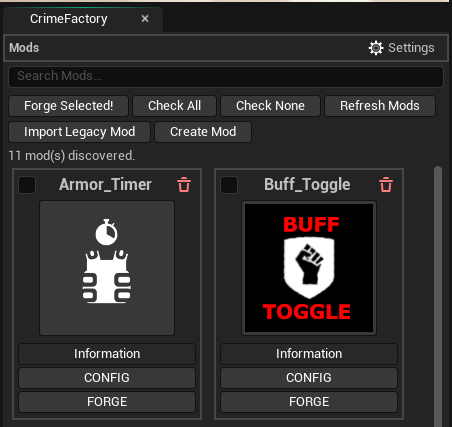
Mod cards
Each discovered mod is shown as a card.
The card gives you access to the common actions for that mod:
-
Information opens the mod’s information and metadata.
-
CONFIG opens the mod-specific configuration.
-
FORGE validates, cooks, and packages that mod.
Click the mod icon to navigate the Content Browser directly to that plugin’s content root.
Selection
Mod cards include selection checkboxes, and the manager includes selection helpers such as Check All.
These controls let CrimeFactory keep selection separate from opening a plugin’s content or information.
Create Mod
Use Create Mod to generate a new CrimeFactory plugin from one of the available templates. The new mod is assigned to the virtual folder open when you click Create Mod, so creating from Root/Nadz adds its card there. The plugin files remain in the modkit’s Mods directory.
See Create Mod.
Import Legacy Mod
Use Import Legacy Mod to migrate an older UE4-style PAYDAY 3 logic mod into the current plugin-based CrimeFactory structure.
See Import Legacy Mod.
Mods are plugins
User mods created by CrimeFactory live under:
<ModkitRoot>/Mods/<ModName>/The modkit also contains the official PDML development plugin under Mods/PDML/ so user mods can access PDML’s API in the editor.
|
Do not modify or Forge the bundled PDML plugin. Create your own plugin alongside it and use the official PDML API from your mod. |