
Asset Palette
The Asset Palette is a dockable CrimeFactory window for finding assets to use in custom heists. It groups available heist assets into category tabs, making it easier to see what you can use and access the assets you need.
Open the Asset Palette
In the editor’s top toolbar, select Window > CrimeFactory > Asset Palette.
You can dock the window alongside your other editor panels to keep it available while working on your heist.
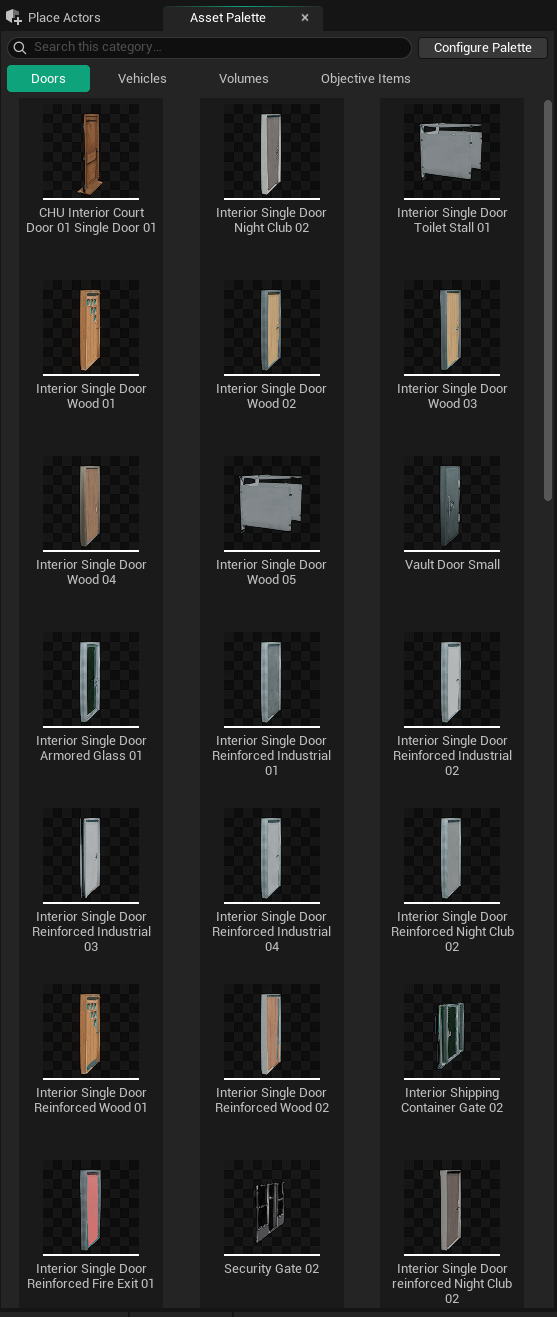
Browse assets
Select a category tab to browse its assets. Each entry displays a preview and an asset name, so you can identify what you need without searching through the game’s folders.
The categories shown above include:
-
Doors
-
Vehicles
-
Volumes
-
Objective Items
Scroll through the selected category to see more entries.
Search within a category
-
Select the category you want to search.
-
Enter an asset name or part of its name in Search this category… at the top of the window.
-
Clear the search text to browse the full category again.
The search applies to the selected category. Switch tabs to look for an asset in another category.