Asset Replacements
Asset replacement mods replace an existing cooked PAYDAY 3 asset with a modified uncooked asset at the same /Game/… package path.
The custom editor can convert supported cooked assets into editable uncooked assets, while CrimeForge uses the mod’s PAL to determine which replacement assets must be included when the mod is Forged.
Before you start
Make sure the cooked-content workflow is working before creating a replacement mod.
You should be able to browse the PAYDAY 3 cooked assets under their original /Game/… paths and open supported assets in read-only mode.
See Cooked Assets if the base-game assets are not visible in the editor.
Find the asset you want to replace
Locate the original cooked asset in the Content Browser under /Game/….
Open the asset in read-only mode first and inspect any defaults, references, materials, parent classes, or other information that may be useful when recreating the modified version.
Convert the cooked asset
Right-click the cooked asset in the Content Browser.
The custom editor exposes two uncooking actions:
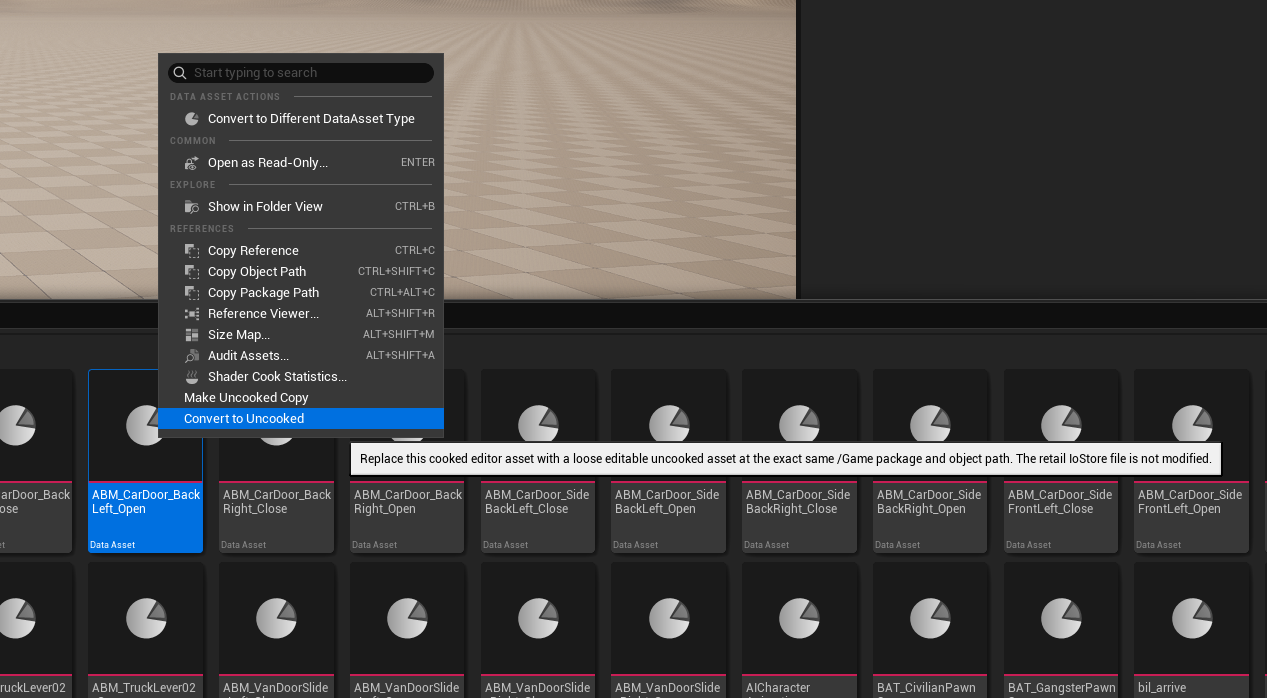
| Action | Behavior |
|---|---|
Convert to Uncooked |
Replaces the cooked editor representation with an editable loose uncooked asset at the exact same |
Make Uncooked Copy |
Creates an editable uncooked copy and lets you choose where that copy is saved. Use this when you want to inspect or work from an uncooked copy without immediately replacing the mounted cooked asset at its original path. |
|
The editor creates a loose uncooked asset that takes the place of the mounted cooked asset inside the editor at the same |
Modify the uncooked asset
After conversion, make the required changes to the editable asset.
The amount of usable data produced by uncooking depends on the asset type.
Basic assets
The following asset types generally work well when converted to uncooked form:
-
Textures
-
Static and skeletal meshes
-
Data Assets
-
Material Instances
These assets can normally be edited directly after conversion, subject to the features supported by that specific asset.
Complex assets
More complex assets cannot currently be reconstructed as complete original editor assets.
This includes assets such as:
-
Blueprints
-
Widgets
-
Materials
For these types, the custom editor recreates as much usable data as it can and generates stubs where required.
The resulting asset is intended to provide a starting point. Additional work is usually required to make the recreated asset match what PAYDAY 3 expects before making the actual modification.
Untested or unsupported assets
Other asset types, including animations, are currently less tested and may not be supported yet.
|
Do not assume that every cooked PAYDAY 3 asset can currently be converted into a working editable replacement. Support is expanded as additional asset types and edge cases are tested. |
Add the replacement to the PAL
Every replacement asset must be added to the CrimeForge mod’s PAL Explicit Assets array.
This step is required.
The replacement still lives at its original /Game/… path rather than inside the mod plugin’s normal content root, so CrimeForge needs the PAL entry to know that the external replacement belongs to this mod and must be included in the Forge output.
Add the modified uncooked asset to:
PAL_<ModName> -> Explicit Assets|
If the replacement asset is not present in the mod PAL’s Explicit Assets array, CrimeForge will not know that the |
Forge the mod
Open CrimeForge and Forge the mod normally.
CrimeForge detects the external /Game/… replacement through the mod’s PAL and includes it in the replacement stage of the Forge process alongside the plugin’s normal mod content.
See Forge for the full Forge workflow.
Test the replacement
Install or copy the Forged plugin mod to:
PAYDAY3/Mods/Launch the game with PDML and verify that the modified asset replaces the original PAYDAY 3 asset as expected.
If the game still uses the original asset, check that:
-
the uncooked replacement is still at the exact original
/Game/…path, -
the modified asset was saved,
-
the asset is present in the correct PAL’s Explicit Assets array,
-
and the mod was Forged again after the change.
Replacement workflow
The full workflow is:
-
Locate the original cooked asset under
/Game/…. -
Inspect the cooked asset and its available defaults and references.
-
Right-click the asset and select Convert to Uncooked.
-
Make the required changes to the uncooked asset.
-
Add the modified asset to the CrimeForge mod PAL’s Explicit Assets array.
-
Forge the mod through CrimeForge.
-
Test the replacement in PAYDAY 3.
|
This workflow can be used for replacing other asset types like |