Mod Information & Configuration
CrimeForge exposes information and configuration actions directly on each mod card.
Information
Click Information to open the mod’s properties.
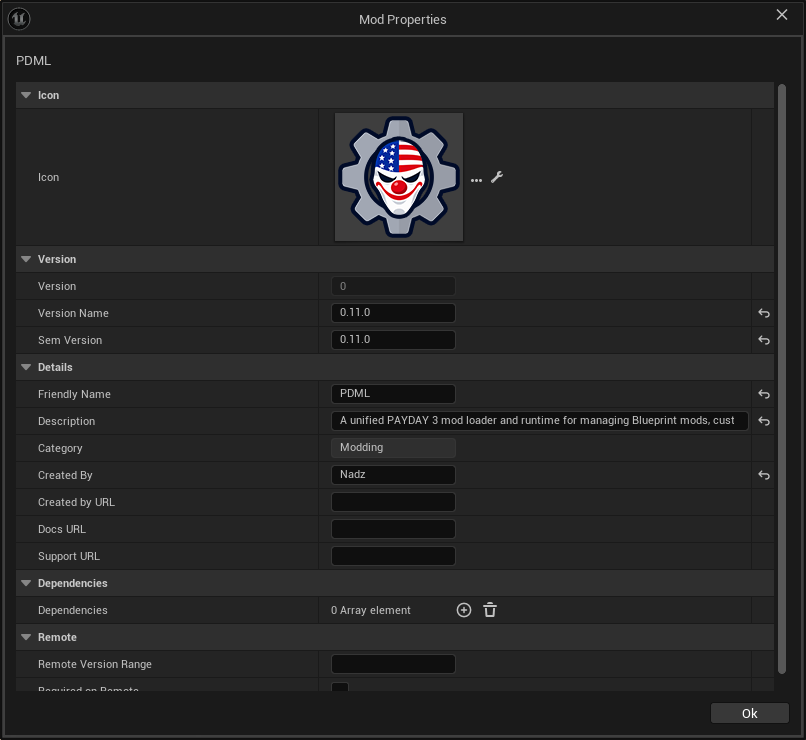
The information window exposes plugin/mod metadata such as:
-
Icon
-
Version
-
Version Name
-
Semantic Version
-
Friendly Name
-
Description
-
Created By
-
Links
-
Dependency information
Use this window for metadata that describes the mod rather than gameplay content stored inside the plugin.
Configuration
Click CONFIG on a mod card to open that mod’s CrimeForge configuration.
The configuration is where the PAYDAY-specific packaging setup for the mod can be reviewed and managed.
CrimeForge uses this configuration together with the mod’s PAL, Asset Manager registration, and replacement asset list when validating and Forging the mod.
See PAL & Explicit Assets for the content-selection side of that configuration.
PAL status and setup
CrimeForge’s information/validation tooling can inspect the mod’s Primary Asset Label and related setup, including:
-
the expected
PAL_<ModName>, -
runtime label configuration,
-
Chunk ID,
-
explicit assets,
-
Asset Manager registration,
-
stale template placeholders,
-
and external
/Game/…replacement assets.
Issues detected here are also used by the Forge preflight.
See Validation.