Create Mod
Use CrimeForge’s Create Mod action to create a new PDML-compatible Unreal plugin.
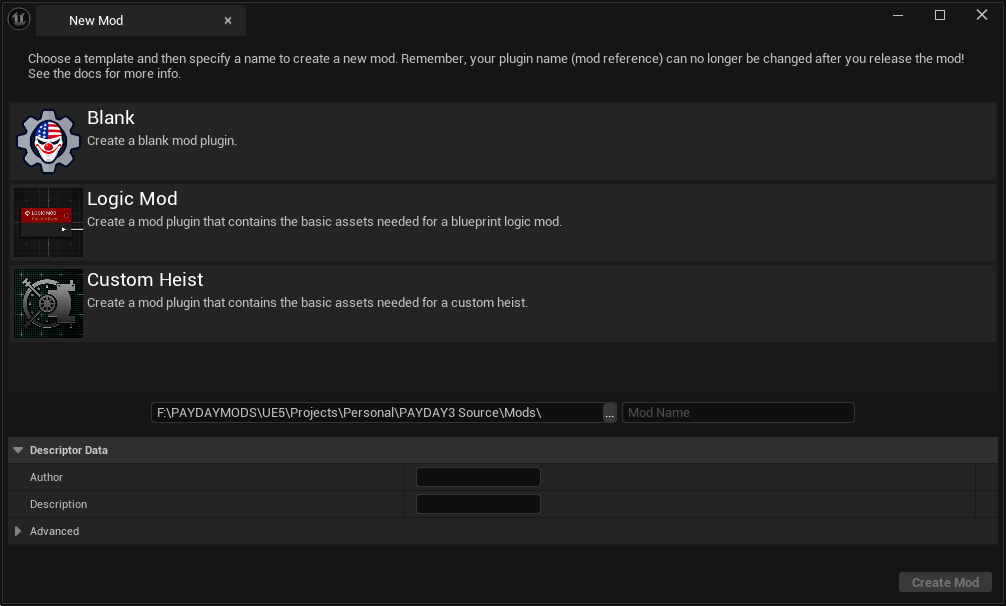
Open the New Mod window
Open CrimeForge and click Create Mod.
The New Mod window lets you choose a template, select the development output location, name the plugin, and enter its descriptor data.
Choose a template
The current templates are:
-
Blank for a general-purpose mod.
-
Logic Mod for Blueprint/runtime logic using PDML.
-
Custom Heist for a new heist plugin.
See Templates for what each template generates.
Choose the output location
The path field controls where CrimeForge creates the new plugin.
For normal modkit development, CrimeForge mods live under:
<ModkitRoot>/Mods/CrimeForge creates new mods there automatically.
Enter the mod name
Enter a short, unique name in Mod Name.
For example:
MyFirstMod|
Treat the mod name as permanent once the mod begins using referenced assets. The plugin name becomes part of the mod’s mount point and asset paths. Renaming it later can invalidate references. |
Descriptor data
The creation window includes descriptor fields such as:
-
Author
-
Description
The Advanced section can be expanded for additional plugin settings when needed.
Create the plugin
Click Create Mod.
CrimeForge creates the selected template as a new Unreal plugin under Mods, then adds it to the CrimeForge mod manager.
The plugin’s content can then be authored normally in the Content Browser.
After creation
From the mod card you can:
-
click its icon to navigate to the plugin content,
-
open Information to edit metadata,
-
open CONFIG for mod-specific configuration,
-
validate the mod,
-
and Forge it when ready.
For a beginner walkthrough, see Create Your First Mod.