Set Up the Project
Before the editor can provide PAYDAY-specific workflows, configure the modkit to use your local PAYDAY 3 installation.
|
The PAYDAY 3 Folder refers to the base Folder of the game.
You know you are in the correct directory if you see
not to to be confused with
|
Open the project
Open the PAYDAY 3 modkit .uproject with the custom Unreal Engine 5.5.4 editor.
If Unreal asks you to select an engine installation, choose the custom editor build intended for this modkit release.
Configure the PAYDAY 3 game path
Open the relevant CrimeForge/modkit project settings located at:
-
Edit on the top left
-
Hit Project Settings
-
Search or locate for CrimeForge
You can then point the game-path setting at your installed PAYDAY 3 game.
|
Do not end CrimeForge’s PAYDAY 3 Game Path with a forward slash ( |

The key settings shown here are:
-
PAYDAY 3 Game Path points CrimeForge at your local game install.
-
Copy Mods To Game copies forged mods to the game automatically after a successful forge.
-
Launch Game After Packing controls whether the game is launched after the forge step. The current UI still uses the word Packing here.
CrimeForge uses the configured game installation for workflows that need access to the locally installed game’s data.
|
Point the setting at your own PAYDAY 3 installation. Do not copy base-game packages into the modkit repository. |
Configure the PAYDAY 3 Cooked Editor
The editor also needs the game installation path and AES key in PAYDAY 3 Cooked Editor settings to mount and load the cooked game assets. Check these settings even if you have already configured CrimeForge and FModel.
-
Open Edit > Project Settings.
-
Under Plugins, select PAYDAY 3 Cooked Editor.
-
Check PAYDAY 3 Installation Directory. If it is missing or incorrect, set it to your PAYDAY 3 installation’s base folder containing
PAYDAY3.exe, using the same installation you configured for CrimeForge. -
If AES Key is not already configured, enter the key from Set Up FModel: Add the PAYDAY 3 AES key.
-
Restart the editor after changing either setting. The retail IoStore containers are mounted during editor startup.
|
Do not end the Cooked Editor’s PAYDAY 3 Installation Directory with a forward slash ( |
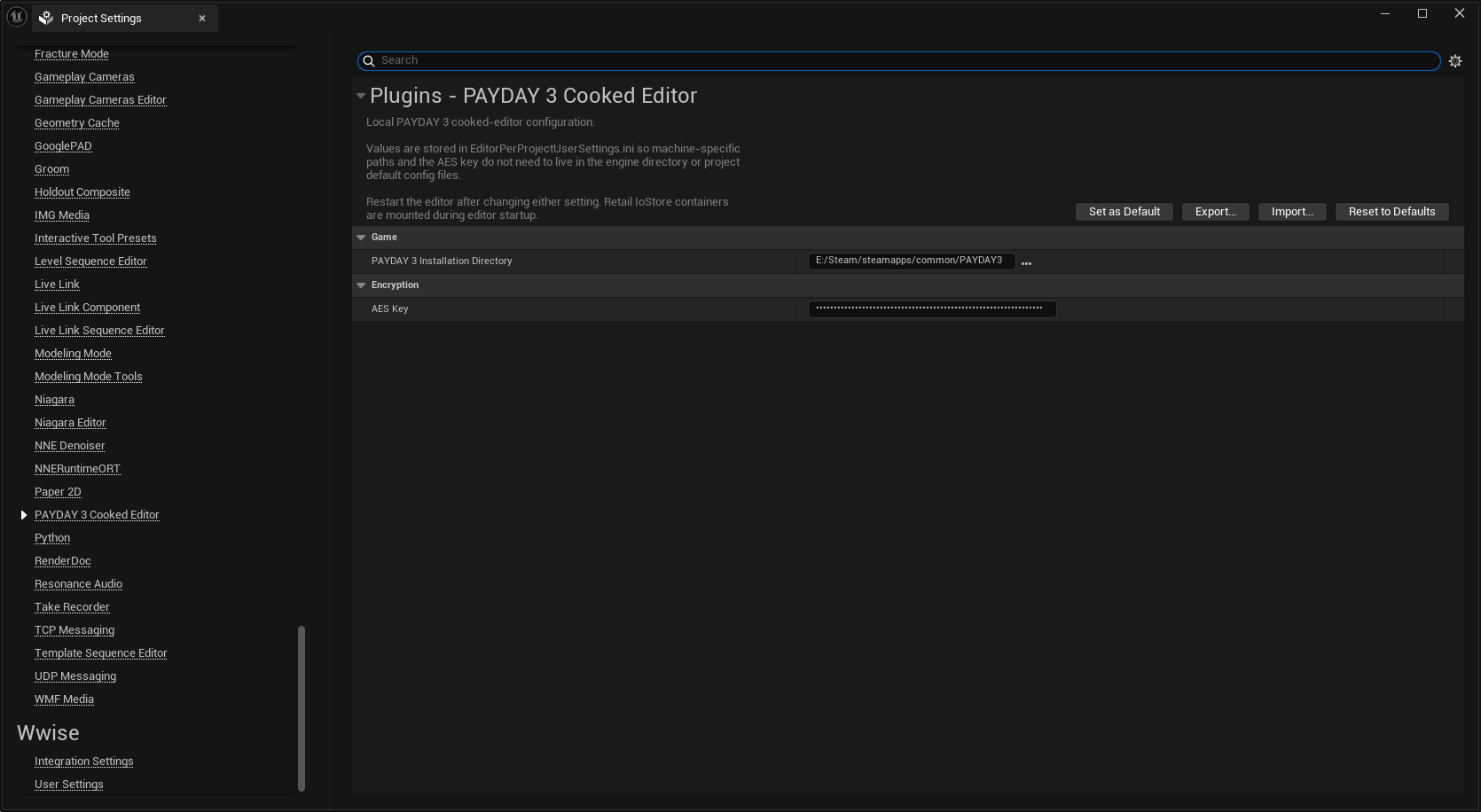
These values are stored locally in EditorPerProjectUserSettings.ini. You do not need to add them to the engine directory or the project’s default configuration files.
Additional data
Some development builds of the tooling may require supporting reflection or mapping data supplied with the modkit release.
Use the files supplied for the exact PAYDAY 3/modkit version you are targeting.
|
Do not publish private keys or other sensitive configuration in screenshots, documentation, repositories, or mod packages. |
Verify
After restarting the editor, open the Content Browser and check that cooked PAYDAY 3 assets appear under their original /Game/… paths. Open a supported asset, such as a texture, to confirm that the editor can load it in read-only mode.
If the assets are missing or fail to load, recheck the PAYDAY 3 Cooked Editor installation directory and AES key, then confirm that the current AssetRegistry.bin and JMAP are in place. See Cooked Assets for the full requirements.
A correctly configured project should load the PAYDAY 3-specific editor tooling without requiring you to reconstruct the game project manually.
Next: Editor Tour.