
UI & HUD Mods
UI replacements modify an existing game Widget Blueprint. PDML UI mods will provide a separate way to add mod widgets to the HUD, but that workflow is still in development.
UI replacements
A UI replacement is a widget replacement. Follow the Asset Replacements workflow and reconstruct the widget’s function and event graphs, as described in Blueprint replacements.
Uncooking a widget does not restore its original function and event graphs. Read the original widget’s FModel decompilation and recreate that logic in the uncooked Widget Blueprint before making your changes.
|
Do not treat an uncooked widget as a complete working replacement. Its layout alone is not enough: missing function and event logic can break the UI’s behavior. |
For help reading the decompilation and translating it into nodes, follow Reconstructing Blueprint Logic from FModel, including its small widget exercise.
Recreate and replace a widget
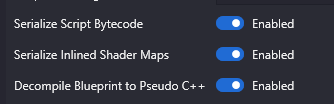
In FModel, enable the two decompilation settings shown below:
-
Complete Set Up FModel for your installed game version.
-
In FModel’s settings, enable Serialize Script Bytecode and Decompile Blueprint to Pseudo C++.
-
Find the original Widget Blueprint in FModel, right-click it, and select Decompile Blueprint.
-
In the custom editor, find the same cooked widget under its original
/Game/…path and select Convert to Uncooked. -
Read the decompiled logic and recreate the function and event graphs in the uncooked Widget Blueprint. Use the reconstruction guide above to identify calls, targets, conditions, and execution paths.
-
Make your UI changes, then compile and save the widget.
-
Add the replacement to your mod PAL’s Explicit Assets, keeping the original asset name and
/Game/…path. -
Forge the mod and test the modified UI in PAYDAY 3.
See Decompile the original Blueprint for the FModel settings and decompilation example, and Forge for packaging.
PDML UI mods
Status: In progress.
PDML UI mods have not been set up yet. A UI injector is being developed to load Mod Widget Blueprints (WBPs) into the HUD when a heist starts.
A CrimeFactory template for this workflow is planned. Setup instructions will be added when the injector and template are available.
Full HUD replacements
For a full HUD replacement, replace only the vanilla game’s SharingHUD and PlayingHUD widgets. Together, these widgets contain all of the HUD elements.
Use the widget replacement workflow above, including recreating the original function and event graphs from the decompilation.
More detailed instructions and a template are planned. The template will contain recreated copies of the vanilla HUD elements with their Blueprint functions included, providing a starting point for a full HUD replacement.