Project Structure
The PAYDAY 3 modkit is a normal Unreal project with additional files and folders used by the cooked-content, reflection, CrimeForge, and PDML workflows.
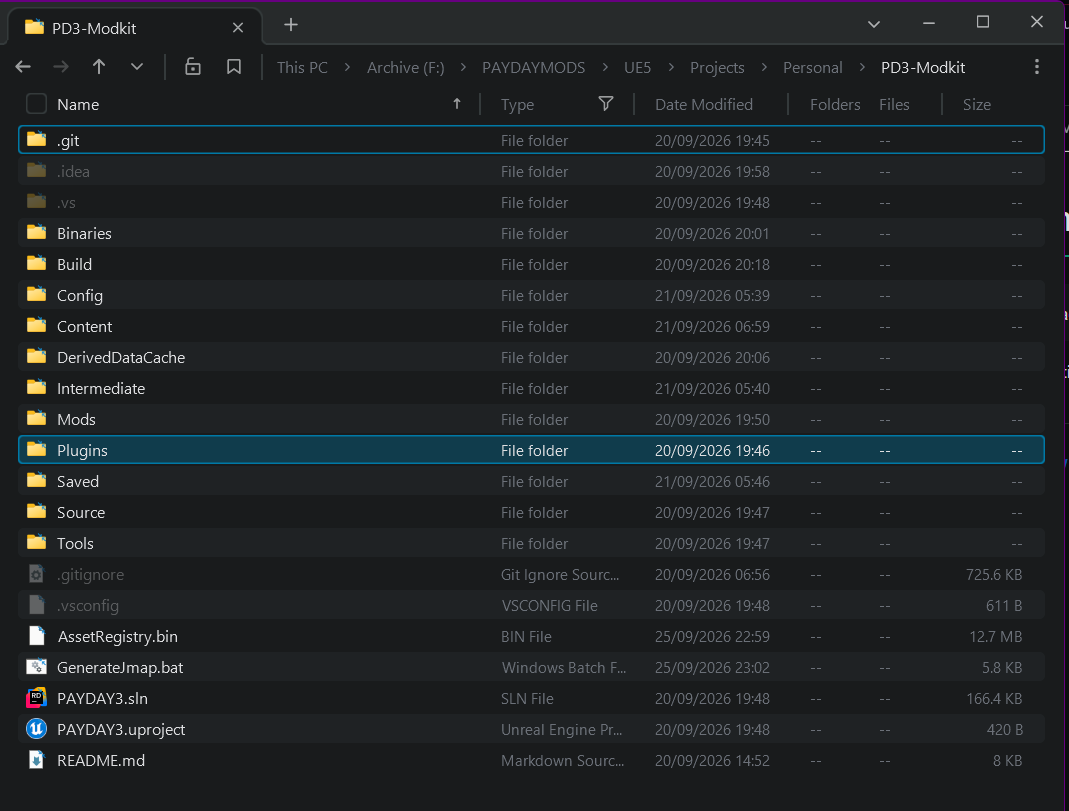
The exact contents of generated folders can vary after the project has been opened or built, but the following entries are the important parts of the modkit layout.
Important root folders
| Path | Purpose |
|---|---|
|
Project content. |
|
Development location for CrimeForge-created mod plugins. CrimeForge creates new mods here automatically. The official PDML development plugin is also included here. |
|
Editor/project plugins used by the modkit, including the PAYDAY-specific tooling and the modified Wwise integration. |
|
Unreal project configuration. |
|
Native source belonging to the modkit project. |
|
Supporting modkit tools. |
|
Built project binaries. |
|
Unreal build metadata and project build files. |
Generated Unreal folders such as DerivedDataCache/, Intermediate/, and Saved/ are created locally as part of normal editor/build use.
IDE metadata such as .idea/ and .vs/ may also exist depending on the tools used on that machine.
Important root files
| File | Purpose |
|---|---|
|
The Unreal project opened with the custom PAYDAY 3 editor. |
|
Visual Studio solution generated for native project/plugin development. |
|
The current PAYDAY 3 Asset Registry extracted from the game and placed in the modkit root. The editor uses it to discover the game’s cooked assets. |
|
Runs the JMAP dumping workflow against a clean running PAYDAY 3 instance. |
|
Keeps generated/local files out of source control. |
The Mods folder

CrimeForge creates user mods automatically inside:
<ModkitRoot>/Mods/Each mod is an Unreal plugin with its own content namespace.
The modkit also ships with:
<ModkitRoot>/Mods/PDML/The PDML plugin is included so user mods can access PDML functions and APIs in the editor.
|
Do not edit or Forge PDML. User-created mods should be separate plugins alongside it in |
Other folders visible in a developer’s local Mods directory can be local projects and are not necessarily part of the stock modkit.